Format and Parsing Issues
Messages are failing to parse or validation errors are occurring.
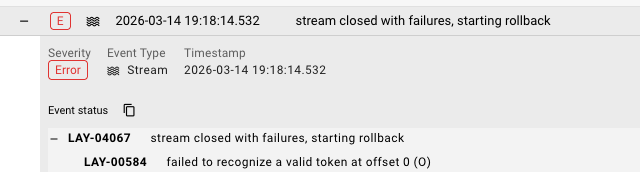 Audit Trail showing parse error with LAY-04067 "stream closed with failures, starting rollback" and LAY-00584 token recognition error
Common Symptoms
- "Parse error" in processor logs
- Schema validation failures
- Incorrect data appearing in message payload
- Character encoding issues (garbled text)
- Binary data treated as text or vice versa
Diagnosis Checklist
1. Verify Format Definition
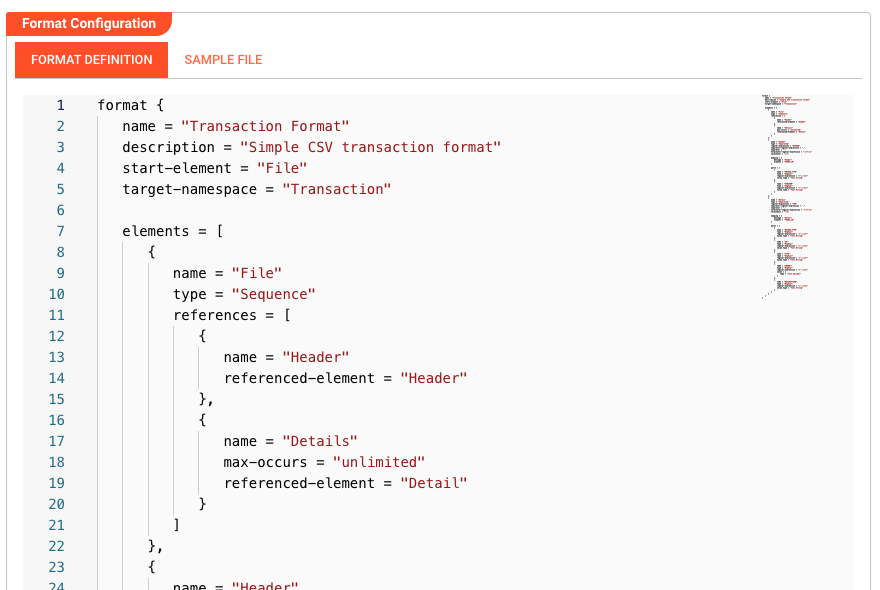 Format Asset configuration showing Format Definition with schema structure (Transaction Format with File, Header, and Detail elements)
The Format Asset defines how raw bytes are converted to structured messages. Check:
| Aspect | What to Verify |
|---|---|
| Format Type | JSON, CSV, XML, Binary, Fixed-width, etc. |
| Schema | Field names, types, and structure |
| Encoding | UTF-8, ASCII, ISO-8859-1, etc. |
| Delimiters | For CSV/flat files — correct delimiter character |
2. Compare Sample Data to Format
Get a sample of the actual data and compare:
Expected (Format Definition):    Actual (Received Data):
{
  "id": number,                  {
  "name": string,                  "id": "ABC123",
  "timestamp": datetime           "name": "Test",
}                                   "created": "2024-01-15"
                                 }
Look for:
- Field name mismatches
- Type mismatches (string vs number)
- Missing fields
- Extra fields
3. Check Encoding
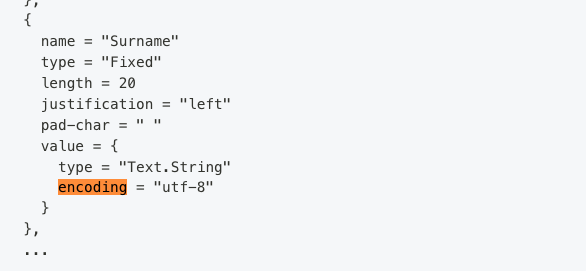 Format grammar configuration showing encoding set to "utf-8" within a field value definition
Encoding is configured within the format grammar (not via dropdown). Check the encoding property in your format definition:
Common encoding issues:
| Symptom | Likely Cause | Fix |
|---|---|---|
| Garbled special characters | Wrong encoding | Set encoding to match source (e.g., encoding = "utf-8" or encoding = "iso-8859-1") |
| "�" replacement characters | Invalid UTF-8 bytes | Check source encoding |
| Accented chars wrong | Latin-1 vs UTF-8 mismatch | Match source encoding in format grammar |
4. Validate Binary vs Text Mode
- Text formats (JSON, CSV, XML): Use text mode
- Binary formats (Avro, Protobuf, images): Use binary mode
- Mixed content: May need custom handling
Common Error Scenarios
"Unexpected token at position X"
Cause: The data doesn't match the expected format.
Examples:
- JSON parser receiving CSV data
- Missing closing brace/bracket
- Trailing commas in JSON
- Unescaped quotes in CSV
Resolution:
- Capture a sample of the failing message
- Validate it with an online parser (JSONLint, etc.)
- Update the Format Asset or fix the data source
"Required field missing"
Cause: Schema validation expects a field that isn't present.
Resolution:
- Check if the field is truly required
- Update Format Asset to make field optional
- Or fix the data source to include the field
"Type mismatch: expected Number, got String"
Cause: Data type doesn't match schema definition.
Examples:
"123"(string) vs123(number)"true"(string) vstrue(boolean)- Date format doesn't match expected pattern
Resolution:
- Update Format Asset to accept the actual type
- Add a Flow Processor to convert types
- Or fix the data source
CSV-Specific Issues
| Issue | Cause | Solution |
|---|---|---|
| Columns misaligned | Wrong delimiter | Set correct delimiter (comma, tab, semicolon) |
| Headers not recognized | Header row missing | Disable "Has header row" or add header |
| Quoted fields break | Quote character mismatch | Set correct quote char (" or ') |
| Newlines in fields | Multiline fields | Enable multiline support |
Debugging Format Issues
Log Raw Messages
Add a processor to see what's being received:
// At the start of your workflow
stream.logInfo('Raw message received:');
stream.logInfo('Content type: ' + message.typeName);
stream.logInfo('Payload: ' + message.toJson());
Test with a Simple Format
Temporarily replace your complex Format with a simple Text or JSON format:
- Create a new Format Asset (JSON, no schema)
- Update your Input Processor to use it
- Deploy and test
- If it works, the issue is in your original Format definition
Use Message View
In Operations → Audit Trail:
- Find a processed message
- Click to view details
- Compare "Raw" vs "Parsed" views
- Identify where the mismatch occurs
Format Best Practices
Start Simple
Begin with a permissive format and add constraints:
- Start: JSON with no schema (accepts any valid JSON)
- Add: Required field validation
- Add: Type checking
- Add: Range/format constraints
Handle Variations
If data format varies:
// JavaScript Processor to normalize
if (typeof message.data.id === 'string') {
    message.data.id = parseInt(message.data.id);
}
Document Expected Format
Keep a sample message in your Project documentation:
{
  "example": "of expected message format",
  "id": 12345,
  "timestamp": "2024-01-15T10:30:00Z"
}
See Also
- Formats — All format types and configuration
- Audit Trail — Inspecting processed messages
- JavaScript Processor — Message transformation
- Python Processor — Message transformation