Processor Script Issues
My JavaScript or Python processor isn't working as expected.
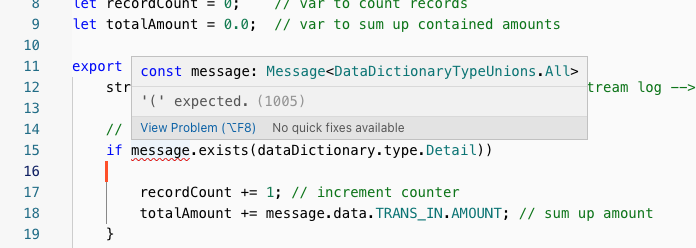 JavaScript Processor code editor showing syntax error highlighting - missing opening parenthesis in if statement with error tooltip
Common Symptoms
- Syntax errors in the code editor
- Runtime exceptions in logs
- Unexpected output or behavior
- Processor showing ERROR state
- Messages not flowing through the processor
Diagnosis Checklist
1. Check for Syntax Errors
In the Project code editor:
- Open your JavaScript/Python Processor
- Look for red error indicators in the editor
- Hover over highlighted code for error messages
2. Review Runtime Logs
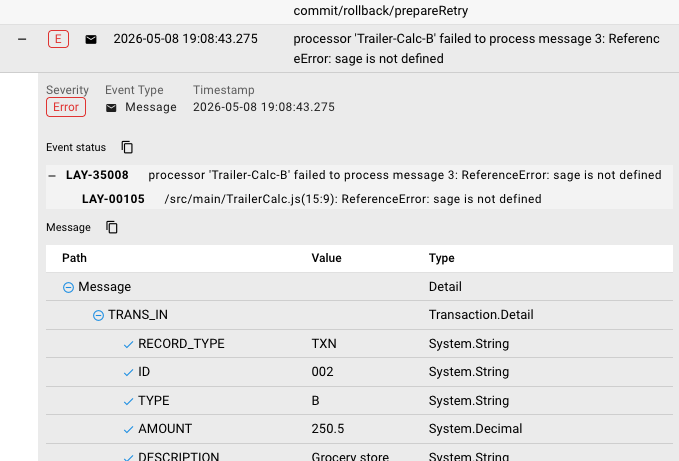 Audit Trail stream log showing JavaScript error - processor 'Trailer-Calc-B' failed with ReferenceError "sage is not defined" at TrailerCalc.js line 15
JavaScript/Python errors appear in the Audit Trail stream log:
- Go to Operations → Audit Trail
- Find the stream for your workflow
- Look for error entries with status codes (e.g., LAY-35008, LAY-00105)
- Click to expand and see full error details with line numbers
3. Test with Minimal Code
Replace your processor code with a simple test:
// Minimal JavaScript test
stream.logInfo('Processor executed');
stream.logInfo('Message payload: ' + message.toJson());
# Minimal Python test
stream.logInfo("Processor executed")
stream.logInfo(f"Message payload: {message.toJson()}")
If this works, the issue is in your specific code logic.
Common JavaScript Errors
"Cannot read property 'X' of undefined"
Cause: Trying to access a property on null or undefined.
Example:
// WRONG - fails if payload is null
const id = message.data.id;

// RIGHT - safe access
const id = message.data?.id;
"JSON.parse: unexpected character"
Cause: Trying to parse invalid JSON.
Resolution:
// Add error handling
try {
    const data = JSON.parse(message.data);
} catch (e) {
    stream.logError('Parse failed: ' + e.message);
}
"Function not defined"
Cause: Calling a function that doesn't exist or is misspelled.
Check:
- Function name spelling
- Variable scope
- Library imports (if using custom libraries)
Common Python Errors
"NameError: name 'X' is not defined"
Cause: Using a variable or function that hasn't been defined.
Resolution:
# Check variable names
stream.logInfo(message.data)  # not stream.logInfo or stream.logInfo
"AttributeError: 'dict' object has no attribute 'X'"
Cause: Using dot notation on a dictionary instead of bracket notation.
Example:
# WRONG - Python dicts use brackets
id = message.data.id

# RIGHT
id = message.data['id']

# Or use get() for safe access
id = message.data.get('id')
"IndentationError"
Cause: Python is strict about indentation.
Resolution:
- Use consistent indentation (4 spaces recommended)
- Don't mix tabs and spaces
- Check for invisible characters
Debugging Techniques
Add Strategic Logging
// JavaScript debugging
stream.logInfo('=== DEBUG ===');
stream.logInfo('Message type: ' + typeof message);
stream.logInfo('Payload type: ' + typeof message.data);
stream.logInfo('Payload keys: ' + Object.keys(message.data || {}));
stream.logInfo('Full payload: ' + JSON.stringify(message.data, null, 2));
# Python debugging
stream.logInfo("=== DEBUG ===")
stream.logInfo(f"Message type: {type(message)}")
stream.logInfo(f"Payload type: {type(message.data)}")
stream.logInfo(f"Payload keys: {list(message.data.keys()) if message.data else 'None'}")
stream.logInfo(f"Full payload: {message.data}")
Test with Hardcoded Values
// Instead of using incoming message
const testData = {
    id: 123,
    name: "Test"
};

// Test your logic
const result = processData(testData);
stream.logInfo('Test result: ' + JSON.stringify(result));
Message Handling Patterns
Safe Property Access
// JavaScript - defensive coding
const value = message.data?.nested?.property ?? 'default';

// Or with explicit checks
let value = null;
if (message.data && message.data.nested) {
    value = message.data.nested.property;
}
# Python - defensive coding
value = message.data.get('nested', {}).get('property', 'default')

# Or with explicit checks
value = None
if message.data and 'nested' in message.data:
    value = message.data['nested'].get('property')
Error Handling in Processors
// JavaScript - graceful error handling
try {
    const result = riskyOperation();
    message.data.result = result;
} catch (error) {
    stream.logError('Operation failed: ' + error.message);
    message.data.error = error.message;
    // Optionally route to error path
    message.setErrorPath('error-handler');
}
# Python - graceful error handling
try:
    result = risky_operation()
    message.data['result'] = result
except Exception as e:
    stream.logError(f"Operation failed: {str(e)}")
    message.data['error'] = str(e)
    message.setErrorPath("error-handler")
Performance Issues
Infinite Loops
Symptoms: Processor hangs, high CPU, no log output
Common causes:
// WRONG - infinite loop
while (true) {  // Never exits!
    process();
}

// WRONG - missing increment
for (let i = 0; i < 10; ) {  // i never changes!
    process();
}
Blocking Operations
Avoid:
- Synchronous network calls
- Long-running computations without yielding
- Heavy memory allocations in loops
Resolution:
- Use asynchronous patterns where available
- Break large operations into smaller chunks
- Consider offloading to external services
Testing Processors
Use Service Functions
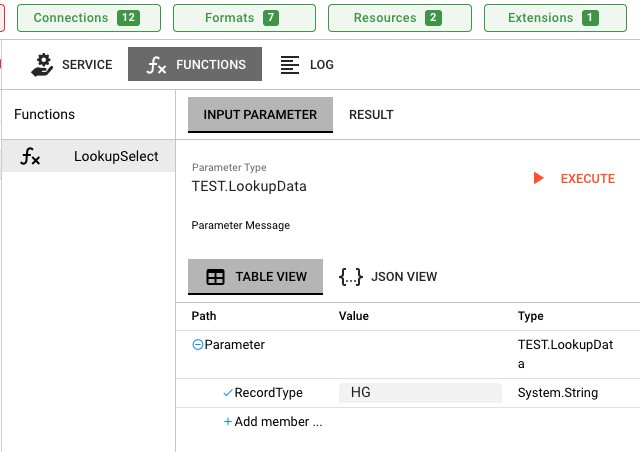 Service Functions tab showing testing interface for LookupSelect function with INPUT PARAMETER section for TEST.LookupData
Note: This testing method only applies to Service Assets (e.g., Database Service, HTTP Service). It does NOT work for Flow Processors (JavaScript Processor, Python Processor) that are part of workflows.
Service Assets expose callable functions that can be invoked directly. Flow Processors in workflows are event-driven and can only be tested by sending messages through the workflow.
For callable services, test directly:
- Go to Operations → Engine State → Services
- Select your Service Asset (not a workflow processor)
- Click the Functions tab
- Select the function you want to test (e.g.,
LookupSelect) - Enter test parameters (use TABLE VIEW or JSON VIEW)
- Execute and review results
To test Flow Processors in workflows, use these methods instead:
- Send a test message through the workflow's Input Processor
- Use the Audit Trail to inspect message processing
- Add logging to your processor and monitor the stream log
Log-Driven Development
// Add logs at key points
stream.logInfo('1. Entering processor');
const input = message.data;
stream.logInfo('2. Input: ' + JSON.stringify(input));

const result = transform(input);
stream.logInfo('3. Transform result: ' + JSON.stringify(result));

message.data = result;
stream.logInfo('4. Exiting processor');
See Also
- JavaScript Language Reference — Complete API documentation
- Python Language Reference — Complete API documentation
- JavaScript Processor — Asset configuration
- Python Processor — Asset configuration