Troubleshooting
When something isn't working, start here. Symptom-based guides to get you back on track.
This section helps you diagnose and resolve the most common issues encountered when working with layline.io. Each guide is organized by the symptom you observe — what you see when things go wrong — with step-by-step diagnosis and resolution.
Quick Diagnosis by Symptom
🚨 My deployment won't start
What you see: The deployment fails to activate, shows an error state in Operations, or produces initialization failures.
Common causes:
- Configuration errors in Assets or Workflows
- Missing or incorrect Environment/Secret Assets
- Missing resource dependencies
- Validation failures
Start here: Deployment Issues
📤 My workflow isn't processing data
What you see: The workflow is deployed and running, but no data is flowing through, or messages aren't being processed.
Common causes:
- Source connectivity issues
- Input Processor not triggering
- Flow Processor logic errors
- Message routing problems
Start here: Workflow Processing Issues
🔌 I can't connect to my source/sink
What you see: Connection errors, timeouts, or authentication failures when reading from sources or writing to sinks.
Common causes:
- Incorrect connection parameters
- Network/firewall issues
- Authentication credential problems
- Missing or misconfigured Connection Assets
Start here: Connection Issues
📋 I'm getting format/parsing errors
What you see: Messages failing to parse, schema validation errors, or incorrect data structures.
Common causes:
- Format definition mismatches
- Schema validation failures
- Character encoding issues
- Binary vs text mode configuration
Start here: Format and Parsing Issues
🛡️ I'm seeing alarms or error states
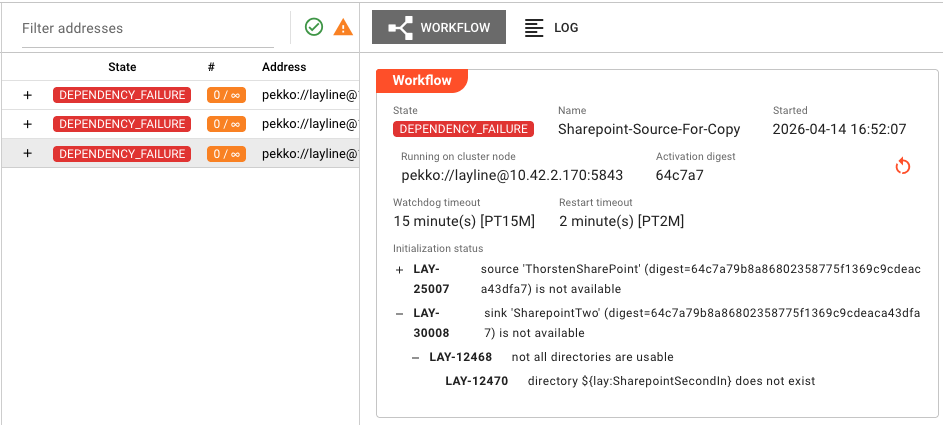
What you see: Alarms appearing in the Alarm Center, red error states in Engine State, or failure indicators on Assets.
Common causes:
- Runtime exceptions in processors
- Resource exhaustion
- Dependency failures
- State synchronization issues
Start here: Alarms and Error States
🔧 My JavaScript/Python processor isn't working
What you see: Script errors, processor failures, or unexpected behavior in custom processor code.
Common causes:
- Syntax or runtime errors in code
- API method misuse
- Message handling issues
- State management problems
Start here: Processor Script Issues
Error Code Reference
When you encounter an error message or code, use this reference to understand what it means and how to resolve it.
Deployment Error Codes
| Status Code | Error Message | Resolution |
|---|---|---|
AssetStatus | missing environment variable name | Ensure all Environment Asset entries have a name defined |
AssetStatus | asset has no valid name | Check the asset Name field is not empty and uses valid characters |
AssetStatus | asset uses a reserved name '%1' | Rename the asset to avoid reserved keywords |
AssetStatus | cyclic inheritance relationship for asset %1 | Review and break the circular inheritance chain |
AssetStatus | duplicate environment value '%1' | Remove duplicate entries in the Environment Asset |
WorkflowStatus | workflow has no valid name | Ensure the workflow has a valid name defined |
DeploymentStorageStatus | unknown deployment with digest '%1' | Verify the deployment exists and is correctly referenced |
Runtime Error Codes
| Code | Description | Resolution |
|---|---|---|
RUN-001 | Source Connection Failed | Verify connection parameters and network access |
RUN-002 | Sink Write Failed | Check sink configuration and destination availability |
RUN-003 | Format Parse Error | Verify format definition matches actual message structure |
RUN-004 | Processor Script Error | Check processor logs for JavaScript/Python runtime errors |
RUN-005 | Message Routing Failed | Verify route conditions and destination processors |
Configuration Error Codes
| Code | Description | Resolution |
|---|---|---|
CFG-001 | Invalid Asset Reference | The referenced asset does not exist or is of the wrong type |
CFG-002 | Missing Required Field | A mandatory configuration field is empty or not set |
CFG-003 | Invalid Value Format | A field value does not match the expected format or type |
CFG-004 | Environment Variable Not Found | The referenced environment variable is not defined |
CFG-005 | Secret Not Found | The referenced secret does not exist in Secret Storage |
Diagnostic Tools
In the Configuration Center
| Tool | Location | Use When |
|---|---|---|
| Validation | Project toolbar | Before deploying — catches configuration errors early |
| Test Connection | Connection Asset settings | Verifying connectivity to external systems |
| Debug Mode | Workflow editor | Troubleshooting workflow logic and message flow |
| Log Viewer | Operations → Engine State | Investigating runtime errors and processor logs |
From the Command Line
# Check cluster and node status
layline cluster status

# View recent logs
layline logs --tail 100

# Validate a project locally
layline project validate --path ./my-project
Getting More Help
If the guides here don't resolve your issue:
- Check the logs — Operations → Engine State → select the failing component → Log tab
- Review the Audit Trail — Operations → Audit Trail for execution history
- Consult the documentation — Use the search bar at the top of this page
- Contact support — Include error codes, log excerpts, and steps to reproduce
See Also
- Operations Overview — Monitoring and controlling deployments
- Engine State — Live view of running workflows
- Alarm Center — Managing system alarms
- Audit Trail — Execution history and diagnostics